不管 GPU 服务器在同一个机房还是分散在不同网络,只要彼此能按需访问,就可以接入同一个管理节点,在一个网页里集中查看和维护。Whether servers are co-located or spread across networks, connect them to one management node and manage everything from a single web page.
server-vps
把零散 GPU 服务器收拢成可登录、可调度、可审计、可自助创建容器的 Web 控制台,让老师、管理员和学生都少碰运维细节,多把时间放回计算任务。 Consolidate scattered GPU servers into a single web console for container creation, scheduling, auditing, and self-service. Less ops overhead for everyone.
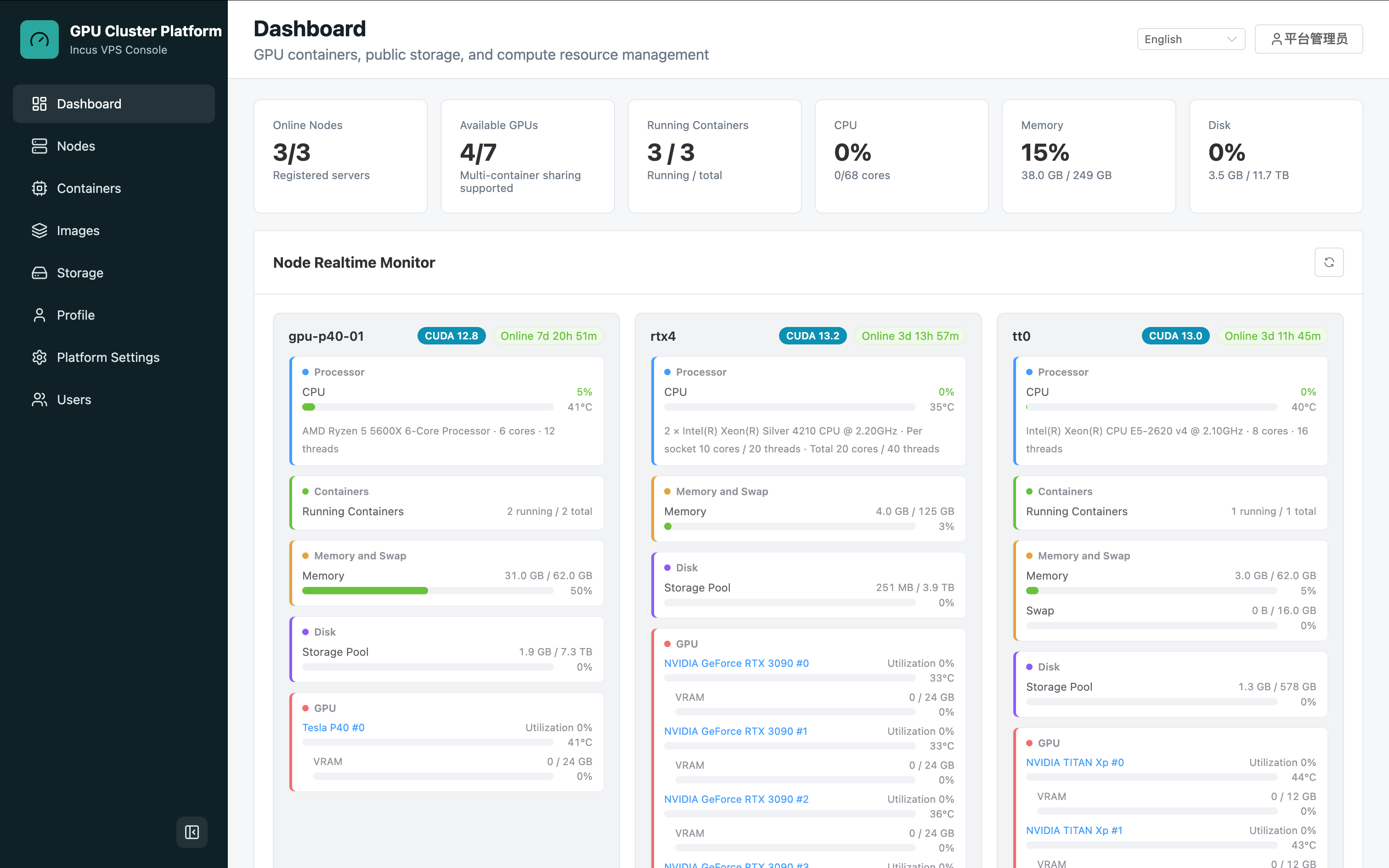
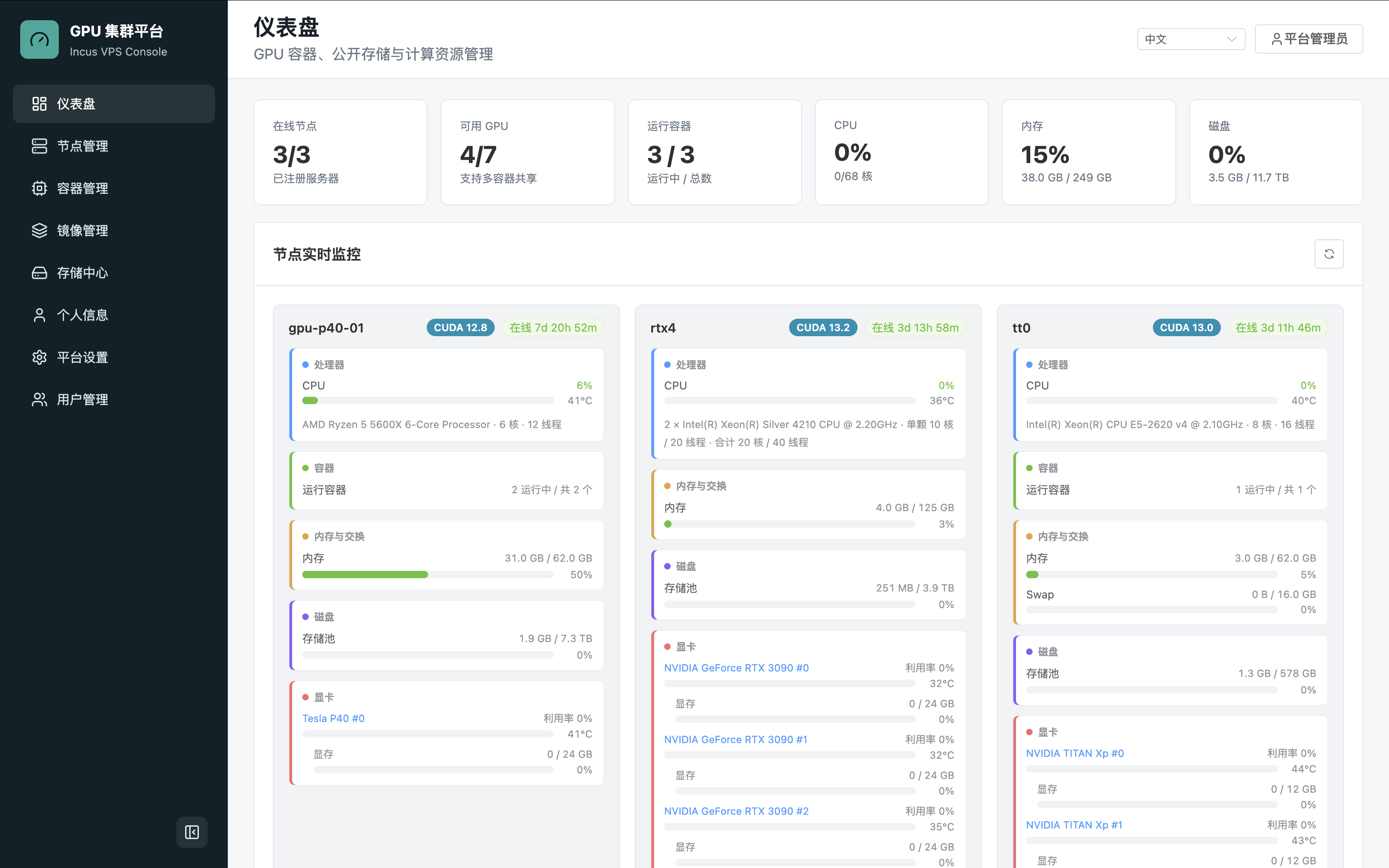
界面截图Screenshots
实际控制台界面,支持中英文切换。 The actual management console, available in Chinese and English.
项目亮点Key Features
server-vps 的核心是把分散的 GPU 服务器变成一个好用的共享平台:老师和管理员看得清资源,学生和成员能自助使用,日常运维也更少靠手工操作。 server-vps turns scattered GPU servers into a shared platform where administrators see resources clearly, members self-serve containers, and day-to-day ops rely less on manual work.
在线节点、可用 GPU、运行容器、CPU、内存、磁盘都会汇总展示,管理员不用一台台登录服务器确认谁在用、还剩多少资源。Online nodes, available GPUs, running containers, CPU, memory, and disk are all summarized. No need to SSH into each server to check resource usage.
成员在网页里选择镜像、GPU、CPU、内存和端口,就能创建自己的实验环境,还可以直接打开浏览器 Shell 进入容器。Members choose image, GPU, CPU, memory, and ports to create their own environment. Browser-based shell access is included.
使用 Incus,更像轻量级 Linux 主机,适合 SSH 登录、后台服务、长期训练任务和多人隔离环境;开销低、启动快,扩展到更多节点也更自然。Powered by Incus — closer to a lightweight Linux host, ideal for SSH access, background services, long-running training jobs, and per-user isolation.
个人文件、共享数据集、模型资源、上传下载、预览和同步都放到存储中心,减少"数据到底在哪台机器上"的混乱。Personal files, shared datasets, model resources, uploads, downloads, previews, and sync are all in the Storage Center. No more "which server has that dataset?" confusion.
节点接入、端口转发、容器 Shell、Agent 发布和升级都可以在控制台完成,管理员不用为每个小操作反复登录服务器。Node onboarding, port forwarding, container shell, agent releases and upgrades — all done from the console without logging into individual servers.
架构概览Architecture Overview
管理节点通过 Docker Compose 运行平台服务;GPU / 存储节点原生运行 Incus 和 cluster-node-agent。 The management node runs platform services via Docker Compose. GPU/storage nodes run Incus and cluster-node-agent natively.
nginx — 唯一 Web/API 入口single Web/API entry point
frontend — Vue 3 + Vite + Element Plus
backend — FastAPI 调度与资源账本scheduling & resource ledger
postgres — 平台数据库platform database
port-router — 公开端口转发public port forwarding
Incus — 容器运行时container runtime
NVIDIA Driver + nvidia-smi — 仅 GPU 节点GPU nodes only
cluster-node-agent — 与管理节点通信communicates with management node
cluster-agent-updater — 可选自动升级optional auto-upgrade
快速开始Quick Start
在管理节点上完成以下步骤即可启动平台。 Complete the following steps on the management node to start the platform.
将项目克隆到管理节点。Clone the project to your management node.
复制 .env.example 并修改必要参数。Copy .env.example and set required values.
运行构建脚本,访问 Web 控制台。Run the build script and open the web console.
# 克隆 / Clone git clone https://github.com/MTKSHU/server-vps.git && cd server-vps # 配置 / Configure cp deploy/.env.example deploy/.env # 至少修改 POSTGRES_PASSWORD、ADMIN_INITIAL_PASSWORD、PORT_ROUTER_TOKEN # At minimum set: POSTGRES_PASSWORD, ADMIN_INITIAL_PASSWORD, PORT_ROUTER_TOKEN # 启动 / Start ./scripts/docker-build-run.sh # 健康检查 / Health check curl http://127.0.0.1:${HTTP_PORT:-80}/api/health
适合什么场景Who Is This For?
server-vps 更偏向小团队自托管:已有几台 GPU 服务器,希望用较低复杂度做账号、额度、容器、端口和数据的统一管理。 server-vps targets small teams running their own GPU servers who want low-complexity unified management of accounts, quotas, containers, ports, and data.